
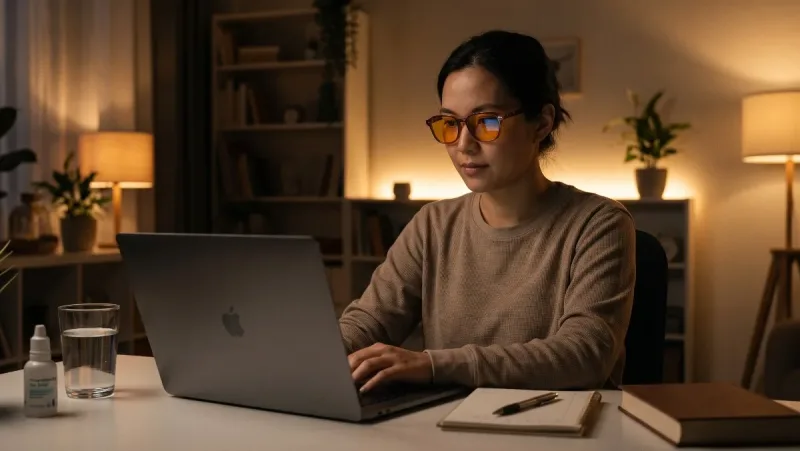
Finishing work on a laptop, scrolling social feeds in bed, or streaming shows late into the evening has become the default nighttime routine for modern digital professionals. However, ending your day bathed in high-intensity artificial light extracts a heavy toll. By midnight, your eyes feel gritty, burning, and dry, while your mind remains buzzing and alert—trapped in a state of wired exhaustion where your body is exhausted, but sleep simply will not come.
The most effective screen hygiene habits to prevent late night eye strain and insomnia focus on reducing short-wavelength blue light exposure, restoring tear film moisture through conscious blinking protocols, shifting display color temperature to amber spectrums, enforcing strict digital sunsets, and eliminating the visual contrast between screens and dark rooms.
Implementing practical, non-disruptive ergonomic and behavioral screen habits protects your photoreceptors from digital fatigue while allowing natural melatonin synthesis to unfold uninterrupted.
The Dual Threat: Why Late-Night Screens Ruin Eyes and Sleep
Staring at backlit displays late at night triggers two separate, compounding physiological issues: ocular muscle exhaustion and circadian endocrine suppression.
-
Digital Asthenopia (Eye Strain): When looking at digital displays, your blink rate drops by over 50%—from an average of 15 to 20 blinks per minute down to just 5 to 7. This rapid drop causes the precorneal tear film to evaporate, leaving the corneal epithelium exposed to dry air, which causes redness, irritation, and blurred vision. Furthermore, the ciliary muscles inside your eyes stay locked in continuous, high-tension contraction to maintain near-point focus.
-
ipRGC Stimulation (The Melatonin Killer): Digital screens emit concentrated high-energy visible (HEV) blue light in the 450 to 480 nanometer range. This specific wavelength matches the peak sensitivity of intrinsically photosensitive retinal ganglion cells (ipRGCs) in your eyes. These cells signal your brain’s master clock (the suprachiasmatic nucleus) that it is midday, suppressing pineal melatonin secretion by up to 85% and shifting your sleep phase hours backward.
-
Dopaminergic Hyperarousal: Late-night smartphone usage is rarely passive. Swiping through short-form videos, answering urgent client emails, or reading contentious social threads delivers variable dopamine rewards, elevating autonomic arousal and heart rate when your body should be downshifting into rest.
1. Implement a 60-Minute "Digital Sunset"
The most definitive boundary you can create for restorative sleep is a non-negotiable electronic cutoff before bed.
-
The 60-to-90-Minute Window: Power down smartphones, laptops, tablets, and gaming consoles at least one hour before turning out the lights. This brief digital buffer allows circulating melatonin levels to rise naturally, lowering core body temperature and facilitating effortless sleep latency.
-
The "Out-of-Reach" Charging Station: The primary barrier to a digital sunset is proximity. Charge your smartphone in another room, in a hallway, or across the bedroom on a dresser rather than on your nightstand. If you use your phone as an alarm clock, replace it with a dedicated digital or analog alarm clock with an amber or dimmable display.
-
Friction-Based App Blockers: If your work requires late availability, install schedule-based blockers that lock non-essential apps, social media feeds, and email notifications starting at 9:00 PM automatically.
2. Shift Displays to Amber and Red Spectrums
If late-night screen work is unavoidable due to urgent deadlines, you must aggressively filter out the blue and green light wavelengths that trigger ipRGC photoreceptors.
-
Automate Software Night Modes: Do not rely on basic brightness sliders. Use built-in operating system features (such as Night Light on Windows, Night Shift on macOS/iOS, or Night Mode on Android) or third-party tools like f.lux. Set them to transition displays automatically to warm, 1900K to 2700K amber tones at sunset.
-
Switch to System-Wide Dark Mode: Invert background illumination across your operating system, text editors, code environments, and web browsers. Dark backgrounds emit significantly fewer lumens into your retina than stark white backgrounds, instantly reducing ciliary strain.
-
Wear Amber- or Red-Tinted Blue Blockers: Standard clear "blue-light blocking" computer glasses often filter out only 10% to 20% of blue light, which is insufficient for late-night circadian protection. For after-hours screen use, opt for dedicated amber- or red-tinted lenses that block 95% to 100% of light between 400 and 550 nanometers (covering both blue and green wavelengths).
3. Practice the 20-20-20 Rule with Complete Blinks
To prevent the dry, burning sensations characteristic of late-night computer fatigue, you must deliberately train ocular lubrication and ciliary muscle release.
-
The 20-20-20 Framework: Every 20 minutes of screen engagement, shift your focus away from your display and look at an object at least 20 feet (6 meters) away for a full 20 seconds.
-
Relaxing the Ciliary Spasm: Looking into the distance allows the internal ciliary muscles of your lens to completely relax, breaking the static mechanical tension caused by hours of near-field focus.
-
The Conscious Full-Blink Exercise: Pair your 20-second break with deliberate full blinks. Close your eyes gently, pause for two seconds to allow the meibomian glands along your eyelids to spread fresh lipid-rich oil across the ocular surface, and open them smoothly. Repeat 5 times.
-
Preservative-Free Lubricating Drops: If your workspace has dry air or air conditioning, keep single-use, preservative-free artificial tears at your desk to hydrate the corneal surface without chemical irritation.
4. Eliminate High-Contrast Lighting (Bias Lighting)
One of the most damaging late-night habits is operating a bright monitor or smartphone in a pitch-black bedroom.
-
The Contrast Dynamic: Staring at a bright screen surrounded by absolute darkness forces your pupils into conflicting optical demands: they want to dilate to capture the ambient dark room, while simultaneously wanting to constrict to protect against the glaring screen pixels. This tug-of-war accelerates ocular fatigue, triggers headaches, and strains retinal nerves.
-
Install Bias Lighting: Place a soft, warm LED light strip behind your computer monitor or television that casts a gentle glow onto the wall behind the display. By raising ambient background illumination to match the screen's luminance, you equalize the visual field and dramatically reduce contrast strain.
-
Use Low-Lux Warm Ambient Lamps: Keep soft, floor-level or desk-level warm lamps (under 2700K, emitting low lux) illuminated in your workspace instead of harsh overhead fluorescent fixtures or total darkness.
5. Optimize Screen Ergonomics and Reading Distance
Poor physical placement of your monitors increases both muscular tension and ocular surface drying.
-
Position Screens Below Eye Level: Position your computer monitor so that the top third of the display sits roughly 15 to 20 degrees below horizontal eye level. When you look slightly downward, your eyelids cover more of your eyeball's surface area, significantly decreasing tear film evaporation and preventing dry eye flare-ups.
-
Maintain the Arm's-Length Standard: Keep computer monitors at a distance of 50 to 70 centimeters (about an arm’s length) from your eyes. For smartphones, hold the device at least 35 to 40 centimeters away rather than holding it close to your face in bed.
-
Increase Text Scale and Contrast: Avoid squinting at micro-typography. Increase default browser zoom, text scale, and code editor font sizes to 125% or 150%. Squinting engages facial muscles that compound tension headaches around the temples and brow ridge.
6. Curate Calming Screen Alternatives for Winding Down
Breaking a smartphone dependency requires substituting it with an equally engaging, low-stimulus nighttime ritual:
-
E-Ink Readers with Warm Front-Lights: If you enjoy reading before bed, swap an iPad, tablet, or phone for a dedicated E-ink e-reader. E-ink screens utilize micro-capsule pigment technology that reflects light naturally like paper, eliminating direct pixel glare into your pupils. Ensure the front-light is set to warm amber or turned off entirely under a warm bedside lamp.
-
Audiobooks and Spoken Audio: Transition from visual entertainment to auditory relaxation. Listening to audiobooks, soothing podcasts, or soundscapes allows you to rest your eyes in a dimly lit room while keeping your mind entertained until drowsiness sets in.
-
Analog Journaling and "Brain Dumps": Spending 5 minutes writing down tomorrow’s priorities, open tasks, or racing thoughts on physical paper empties working memory, down-regulating cognitive stress loops without blue light exposure.
Medical Disclaimer: The information provided in this guide is for educational and informational purposes only and does not constitute medical advice, optometric diagnosis, or clinical sleep treatment. If you experience severe, persistent dry eyes, chronic insomnia, visual disturbances, or continuous ocular pain, consult a licensed optometrist, ophthalmologist, or board-certified sleep physician.



Comments
No comments yet. Be the first to ask a question or share an update.
Leave a comment
Your mobile number is never published. Comments appear after review. Website links, email addresses and code are not allowed.